Order management in a busy restaurant isn't a single problem. It's a chain of smaller problems — an order that arrives incomplete, a modification that doesn't reach the cook, a finished dish that sits at the pass because no one knew it was ready. Kitchen display solutions address this chain. But the word "solution" is doing a lot of work in vendor marketing, because not all of them actually solve the same problems.
In this guide, you'll learn what separates genuinely effective kitchen display solutions for order management from systems that look good in a demo but fall apart under real service conditions — so you can evaluate your options with the right questions.
Good order management doesn't start at the kitchen door. It starts at the point of entry.## What "Order Management" Actually Means in a Restaurant Context
Order management in a restaurant context means something more specific than "keeping track of orders." It means ensuring that every order, from every channel, with all of its modifications and special instructions, reaches the correct person in the kitchen at the correct time, with enough context to execute it correctly, and with a way to communicate completion back to the front of house.
Break that definition down and it reveals why basic systems fail. A system that receives orders from only some channels misses deliveries. A system that passes item names but drops modifiers misses the cook's context. A system that marks items complete but doesn't notify the front of house creates a gap at the pass. A system that shows all items on all screens overwhelms cooks with irrelevant information.
Great order management closes every one of those gaps. It's not about any single feature. It's about the integrity of the information chain from point of entry to plate at the table.
After working through what order management requires end-to-end, five qualities distinguish solutions that work from those that look like they work until they're under pressure:
Completeness of order data. Every piece of information in the original order — item, quantity, modifier, allergy flag, table number, seat assignment, timestamp — should arrive at the kitchen screen intact. Any system that silently drops fields is creating the same information failures it was supposed to prevent, just in a different part of the process.
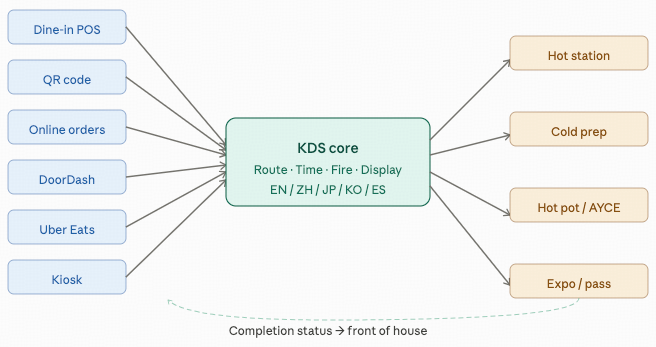
Unified channel handling. A restaurant that uses a server POS, a QR code ordering system, a branded online ordering page, and a third-party delivery aggregator has four separate order streams. A kitchen display solution that only captures some of them splits the kitchen into two tiers: orders it can see and orders it can't. In practice, this means some order types are managed on screen while others go to a printer or a separate device. The friction this creates — cooks scanning multiple sources for tickets — is exactly the friction the system was supposed to eliminate.
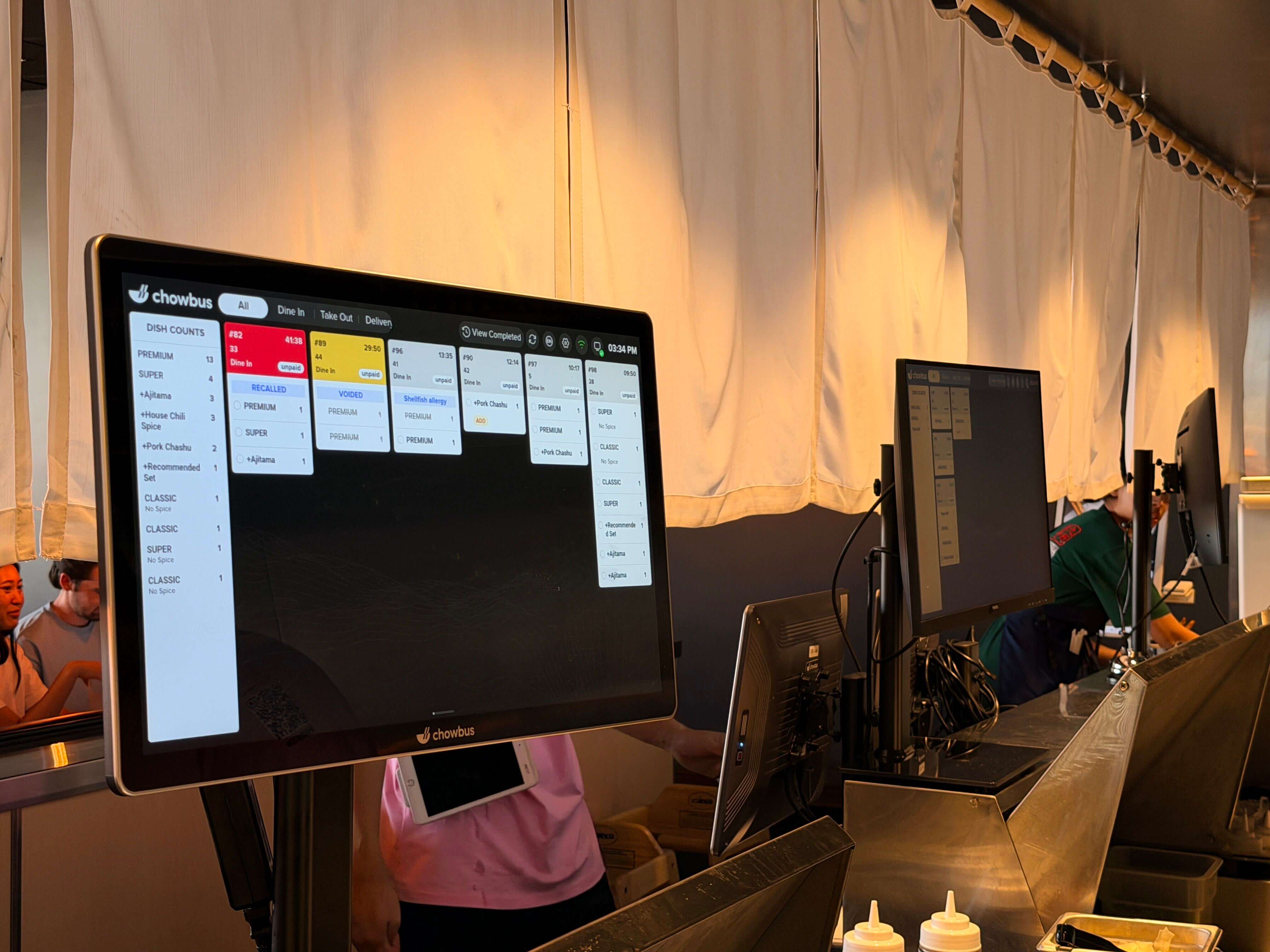
Modification visibility. An order modification that arrives silently is worse than no modification system at all, because it creates the illusion that the original order is still correct when it isn't. Modifications should arrive as clear, visually distinct alerts on the kitchen screen, tied to the original ticket, so the cook immediately knows what changed and in what context.
Accurate timing and prioritization. Not all tickets are equal in urgency. A ticket that has been sitting for twelve minutes is more urgent than one that arrived sixty seconds ago, regardless of what order they appear in the queue. A good KDS colors tickets by elapsed time and allows managers to set station-level priority rules so the kitchen surfaces its oldest open tickets automatically.
Completion loop closure. The order management cycle is not complete when the cook marks a dish done. It's complete when that status reaches the server, who picks up the dish and delivers it to the table. Any gap in this loop — a notification that doesn't reach the server, a pass screen that doesn't update — means the dish sits, the table waits, and the kitchen's output is wasted. The front-of-house notification mechanism is not a secondary feature. It is the mechanism that connects the kitchen's work to the guest's experience.
Most kitchen display solutions are designed for a standard order flow: one server, one order, one kitchen pass, one table. Asian restaurant formats regularly depart from this structure in ways that expose the limitations of generic solutions.
The continuous re-order challenge. Hot pot, shabu-shabu, and AYCE formats involve guests placing multiple orders across an extended meal. Each new order is a re-order from a table already in the system. Without re-order tagging, the kitchen cannot distinguish between a first order and a fifth-round re-order from the same table — and that distinction matters for timing, preparation, and resource allocation.
The volume-per-table challenge. Dim sum service generates more individual items per table than almost any other restaurant format. A standard six-item order flow is manageable with basic display logic. A twenty-item order flow that includes items for multiple stations, with some items needing to wait for others before being served together, requires smarter routing and sequencing logic.
The multilingual staff challenge. A kitchen where the head cook reads Chinese and the prep station worker reads English needs a display system that works for both. Not a system that forces one to adapt to the other's language, but one that displays information in both simultaneously. This is a practical kitchen management requirement in most Asian restaurant back-of-house environments.
The modification language challenge. A server who enters a modification in English, for a guest who specified it in Chinese, for a cook who reads in Chinese — each handoff in that chain is an opportunity for information to degrade. A bilingual KDS that stores and displays modifications in both languages closes that chain without requiring any individual to translate.
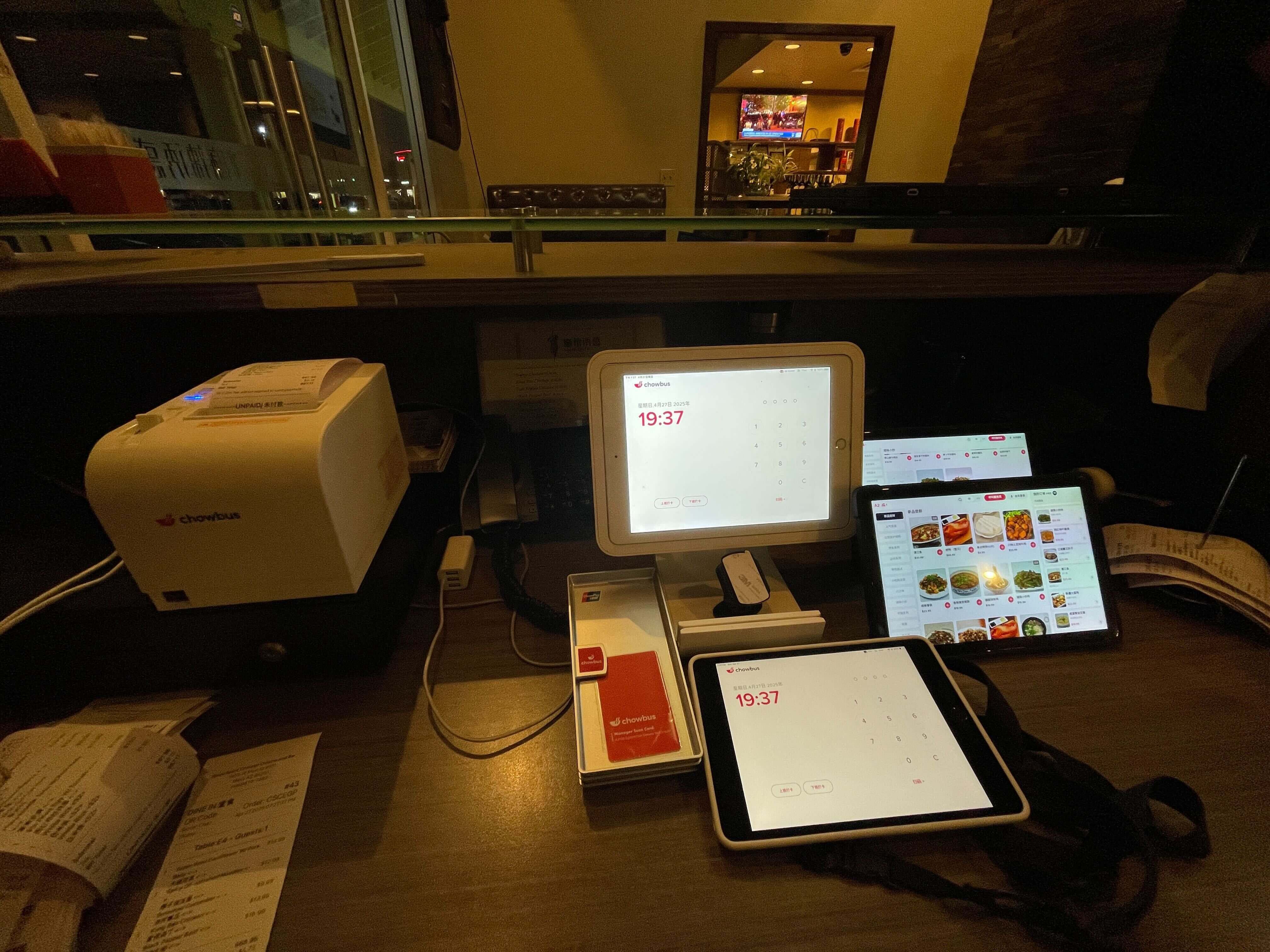
Chowbus's kitchen display solution is built inside its all-in-one POS platform, which means it receives the full data set from every channel the platform supports: server POS, QR code ordering, kiosk, branded online ordering, and third-party delivery aggregation. There is no partial integration between systems; all orders arrive in the same queue.
The routing engine distributes items to the appropriate kitchen stations based on category rules set during configuration. AYCE and hot pot re-orders are tagged with table number and round number automatically. Item names display in both English and Chinese. Modification alerts appear visually distinct from standard items. The expediter's pass screen shows consolidated item status across all stations so the front of house knows when a full table's order is ready to go out.
For Asian restaurant operators managing multilingual kitchens, multi-channel ordering, and high per-table order volumes simultaneously, this architecture reflects the actual requirements of the service format — rather than a generic template that requires workarounds to function in an Asian restaurant context.
Great kitchen display solutions for order management aren't defined by the number of features in the spec sheet. They're defined by how completely they close the information loop between the point an order is placed and the point the guest receives it.
For Asian restaurants managing higher complexity than most generic solutions anticipate — continuous re-orders, multilingual kitchens, multi-channel ordering — the evaluation question is whether the solution was designed with those conditions in mind or whether it requires workarounds to function in them. Systems that require workarounds shift the management burden back to humans, which is exactly the problem a kitchen display solution is supposed to solve.
Q1: What makes a kitchen display solution good for order management specifically? A: A genuinely good solution closes the entire order management loop: all channels are captured, complete order data (including modifiers and allergy flags) reaches the correct station, modifications arrive as clear alerts, timing is tracked and surfaced, and dish completion is communicated back to the front of house. Missing any of these steps creates the same category of errors that manual systems produce, just at a different point in the process.
Q2: Can a kitchen display system handle orders from multiple channels simultaneously? A: Yes, if the system is designed to consolidate multiple order channels. A native all-in-one POS platform with integrated KDS handles this most reliably. Third-party standalone KDS solutions that connect to a POS via integration may capture in-house orders but not delivery or online orders unless additional integrations are configured. For restaurants using multiple channels, confirming which sources the KDS actually receives is the critical first question.
Q3: How does a KDS handle continuous re-orders in an AYCE restaurant? A: A KDS designed for AYCE operations tags each incoming order with its table number and round number, distinguishing re-orders from initial orders. The kitchen can see at a glance which tables are on their second or third round and prioritize accordingly. Standard KDS systems not designed for AYCE treat each order as a new cover — which creates confusion when multiple rounds from the same table arrive in quick succession.
Q4: What's the difference between order management with a KDS versus a paper ticket system? A: Paper systems rely on physical tickets moving through a kitchen and on verbal communication for modifications and completions. Information is lost when tickets are damaged, reordered, or missed under pressure. A KDS digitizes the entire chain: orders arrive instantly, modifications update the existing ticket, timers track elapsed time automatically, and completion status travels back to the front of house digitally. The failure modes are different and, in a reliable system, significantly less frequent.
Q5: How does a KDS improve communication between the front and back of house? A: By replacing every verbal relay and physical check with a system-mediated notification. The server doesn't need to walk to the kitchen to check if a dish is ready; the KDS notifies them. The manager doesn't need to be present at the pass to know which stations are falling behind; the KDS shows ticket times in real time. The kitchen doesn't need to shout over the pass when food is ready; the screen updates automatically. Each of these replacements removes a potential failure point from the communication chain.
繁忙餐厅里的订单管理,不是一个单一问题,而是一条小问题的链条——不完整到达的订单、没传到厨师那里的改单、备好了却没人知道可以取餐的菜。厨房显示解决方案应对的是这条链条。但"解决方案"这个词在供应商营销里承担了太多含义,因为并不是所有系统都真的解决了同样的问题。
读完这篇指南,你会了解什么区分了真正有效的订单管理厨房显示解决方案和在演示时好看、在真实出餐中崩溃的系统——让你能带着正确的问题评估选项。
好的订单管理不是从厨房门口开始的,而是从录单那一刻开始的。
餐厅语境下的订单管理,意思比"追踪订单"更具体。它意味着:确保每一个订单,来自每一个渠道,带着所有备注和特殊要求,在正确的时间送达后厨的正确的人,有足够的上下文让他正确执行,并且有一种将完成状态传回前厅的方式。
拆解这个定义,就能看清为什么基础系统会失效。只从部分渠道接收订单的系统会漏单,传递菜品名称但丢掉备注的系统遗漏了厨师需要的上下文,标记完成但不通知前厅的系统在传菜口留下了空隙,把所有品项显示在所有屏幕上的系统用无关信息淹没了厨师。
真正好的订单管理,堵住了上述每一个漏洞。不是靠任何单一功能,而是靠从录单到菜品上桌的整条信息链的完整性。
梳理完订单管理的端到端要求之后,五个特质区分了真正有效的解决方案和看起来有效直到承压才暴露问题的系统:
订单数据的完整性。 原始订单中的每一条信息——菜品、数量、备注、过敏标记、桌号、座位号、时间戳——都应该完整地到达厨房屏幕。任何静默丢弃字段的系统,都在制造它本应预防的信息失效,只不过发生在流程的不同位置。
统一渠道处理。 同时使用服务员POS、扫码点餐系统、品牌线上点餐页面和第三方外卖平台的餐厅,有四条独立的订单流。只捕获其中一部分的厨房显示解决方案,把后厨分成了两个层级:它能看到的订单和它看不到的订单。实际上,这意味着一些订单类型在屏幕上管理,另一些靠打印机或单独设备处理。这种摩擦——厨师扫描多个来源寻找票据——恰恰是这个系统本应消除的摩擦。
改单可见性。 静默到达的改单,比没有改单系统还糟糕,因为它制造了原始订单依然正确的假象,而实际上已经不正确了。改单应该以清晰、视觉上区别于普通品项的提示到达厨房屏幕,关联到原始票单,让厨师立刻知道什么变了、在什么上下文里变的。
准确的计时和优先级。 不是所有票单的紧迫程度都一样。已经等了十二分钟的票单,比六十秒前才到的更紧急,不管它们在队列里的排列顺序。好的KDS按经过时间给票单着色,允许管理者设置档口级别的优先级规则,让后厨自动将最老的未完成票单推到显眼位置。
完成回路的闭合。 订单管理周期在厨师标记菜品完成时并没有结束,而是在这个状态送达服务员、服务员取餐并送到桌上时才结束。这个回路中的任何空隙——没有送达服务员的通知、没有更新的传菜口屏幕——都意味着菜品在等待,客人在等待,后厨的产出被浪费了。前厅通知机制不是次要功能,它是连接后厨工作和客人体验的机制。
大多数厨房显示解决方案为标准订单流程设计:一个服务员、一张订单、一个传菜口、一张桌子。亚裔餐厅格式经常偏离这个结构,暴露通用解决方案的局限性。
持续追单的挑战。 火锅、涮锅和AYCE格式涉及客人在一顿延长的用餐过程中多次下单。每个新订单都是系统中已有桌子的追单。没有追单标记,后厨就无法区分首次订单和同一张桌子的第五轮追单——而这个区别对时机、备餐和资源分配都有意义。
每桌订单量大的挑战。 点心服务每桌产生的单品数量几乎超过任何其他餐厅格式。基础显示逻辑能处理六品项订单,但需要服务多个档口、部分品项需要等其他品项才能一起上桌的二十品项订单,需要更智能的路由和排序逻辑。
多语言员工的挑战。 主厨读中文、备料档口员工读英文的后厨,需要同时适用于两者的显示系统。不是让一方适应另一方的语言,而是同时以两种语言显示信息。在大多数亚裔餐厅后厨管理环境中,这是一个实际的运营要求。
真正好的订单管理厨房显示解决方案,不是由规格表上的功能数量定义的,而是由它多完整地闭合了从下单到客人收到菜品之间的信息回路来定义的。
对管理着超出大多数通用解决方案预期的复杂度的亚裔餐厅来说——持续追单、多语言后厨、多渠道点单——评估问题是:这个解决方案是在考虑了这些条件的情况下设计的,还是需要变通方案才能在这些条件下工作。需要变通方案的系统,把管理负担推回到了人的身上,而这恰恰是厨房显示解决方案本应解决的问题。
Q1: 什么让厨房显示解决方案真正擅长订单管理? A: 真正好的解决方案闭合了整个订单管理回路:所有渠道都被捕获,完整的订单数据(包括备注和过敏标记)到达正确的档口,改单以清晰提示到达,时机被追踪和显示,菜品完成状态被通知回前厅。缺少任何一个步骤,就会在流程的不同位置制造和手动系统同样类别的错误。
Q2: 厨房显示系统能同时处理多个渠道的订单吗? A: 可以,如果系统是为整合多个点单渠道而设计的。带有集成KDS的原生一体化POS平台处理这个问题最可靠。通过集成连接POS的第三方独立KDS解决方案,可能能捕获堂食订单,但如果没有配置额外的集成,可能捕获不到外卖或线上订单。对使用多个渠道的餐厅来说,确认KDS实际接收哪些来源,是最关键的第一个问题。
Q3: KDS如何处理AYCE餐厅的持续追单? A: 为AYCE运营设计的KDS给每条进入的订单打上桌号和轮次标记,区分追单和初始订单。后厨一眼就能看到哪些桌子在第二轮或第三轮,并相应地排列优先级。非为AYCE设计的标准KDS会把每张订单当作新桌——当同一张桌子的多轮追单快速连续到达时,这会造成混乱。
Q4: KDS如何改善前后厅之间的沟通? A: 通过用系统中介的通知取代每一个口头传递和人工检查。服务员不需要走到后厨检查菜是否好了,KDS会通知他们。管理者不需要守在传菜口才能知道哪个档口在落后,KDS实时显示出票时间。后厨不需要隔着传菜口喊菜好了,屏幕自动更新。每一个这样的替代,都从沟通链条中移除了一个潜在的失效点。