Ticket rails work right up until the moment they don't. For most high-volume restaurants, that moment arrives faster than expected — and it tends to arrive during the busiest service of the week.
Across 9,000+ restaurants in all 50 states, operators who have made the switch from paper tickets to a kitchen display system consistently report the same outcome: fewer errors, faster service, and a kitchen that communicates without the front-of-house staff acting as a relay. The technology isn't new, but what it can now do — especially for Asian restaurants with complex order structures — has changed significantly.
In this guide, you'll get a complete picture of what a kitchen display system is, how it works, what to look for, and what questions to ask any vendor before signing — so you can invest in a system that holds up in real service conditions, not just in a demo.
Here's what the operators who got it right understood before they signed anything.## What a Kitchen Display System Actually Is
A kitchen display system is a purpose-built combination of commercial hardware and restaurant-specific software that receives orders from your POS and displays them to kitchen staff in real time. It replaces paper tickets as the primary communication medium between the front of house and the back of house.
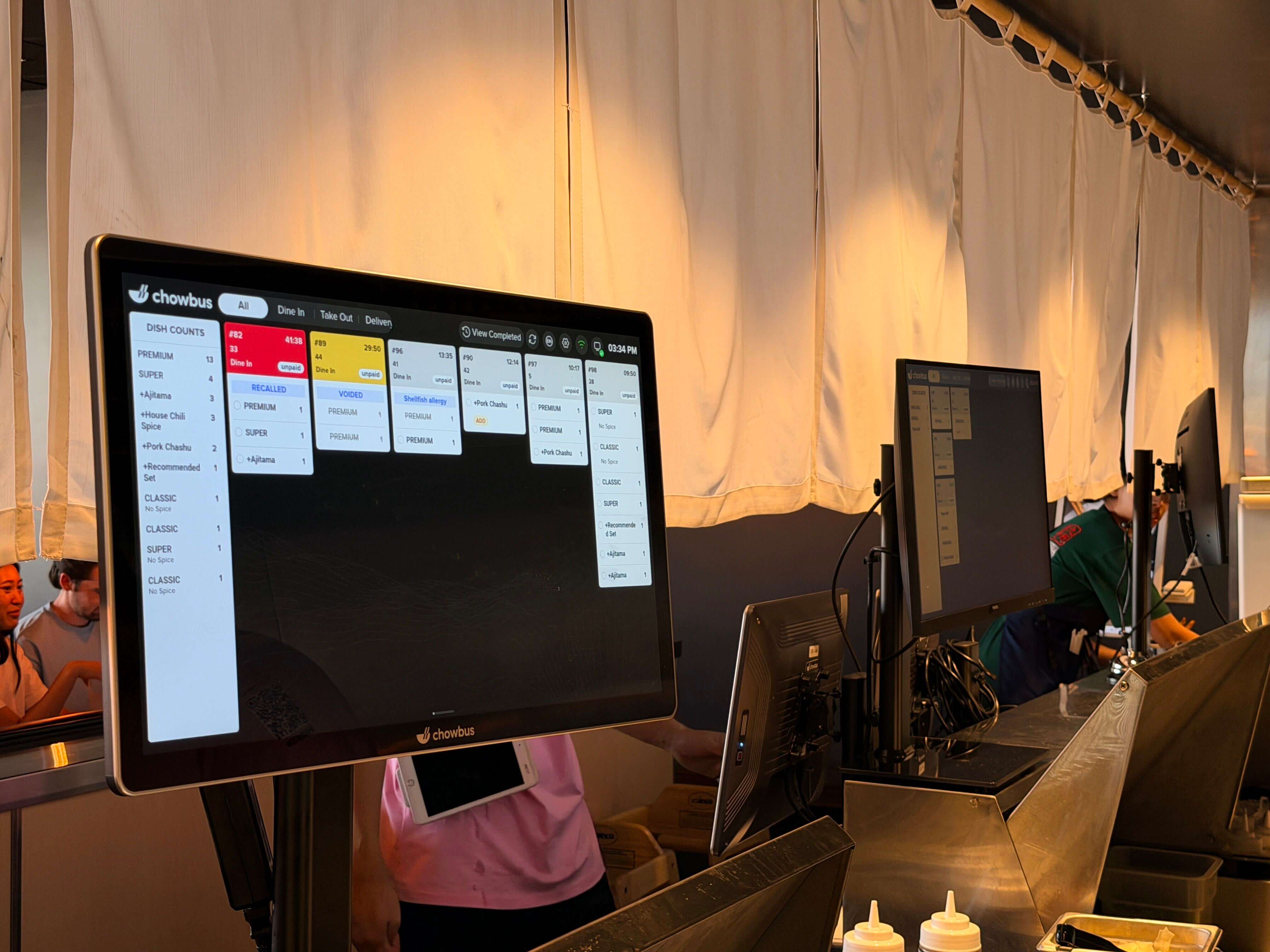
The hardware is a commercial-grade screen — or multiple screens — mounted at kitchen stations. The screens are brighter, more durable, and sealed against the heat, moisture, and grease of a working kitchen. They don't use paper, don't jam, and don't require daily maintenance. The software receives order data, routes items to the correct station, tracks time from order entry to completion, and allows cooks to mark items ready. That completion status travels back to the POS and to front-of-house staff.
What separates a KDS from simply showing orders on any screen is the operational logic: routing rules, modification handling, allergy flagging, AYCE re-order tagging, and integration with the broader POS ecosystem. These are the layers that determine whether the system improves your kitchen or adds another thing to manage.
A complete kitchen display system has four layers that need to work together:
The first is the display hardware — commercial screens at each station, chosen for brightness, durability, and enclosure rating. A standard 15-inch or 22-inch portrait-orientation display is common for station use. A larger landscape display works well at the expediter's pass where multiple tickets need to be visible simultaneously.
The second is the KDS software — the application that runs on the display, receives orders from the POS, manages the queue, and handles interactions like bumping an item complete or recalling a cleared order. The software should have a visual hierarchy that makes new, in-progress, and overdue tickets immediately distinguishable.
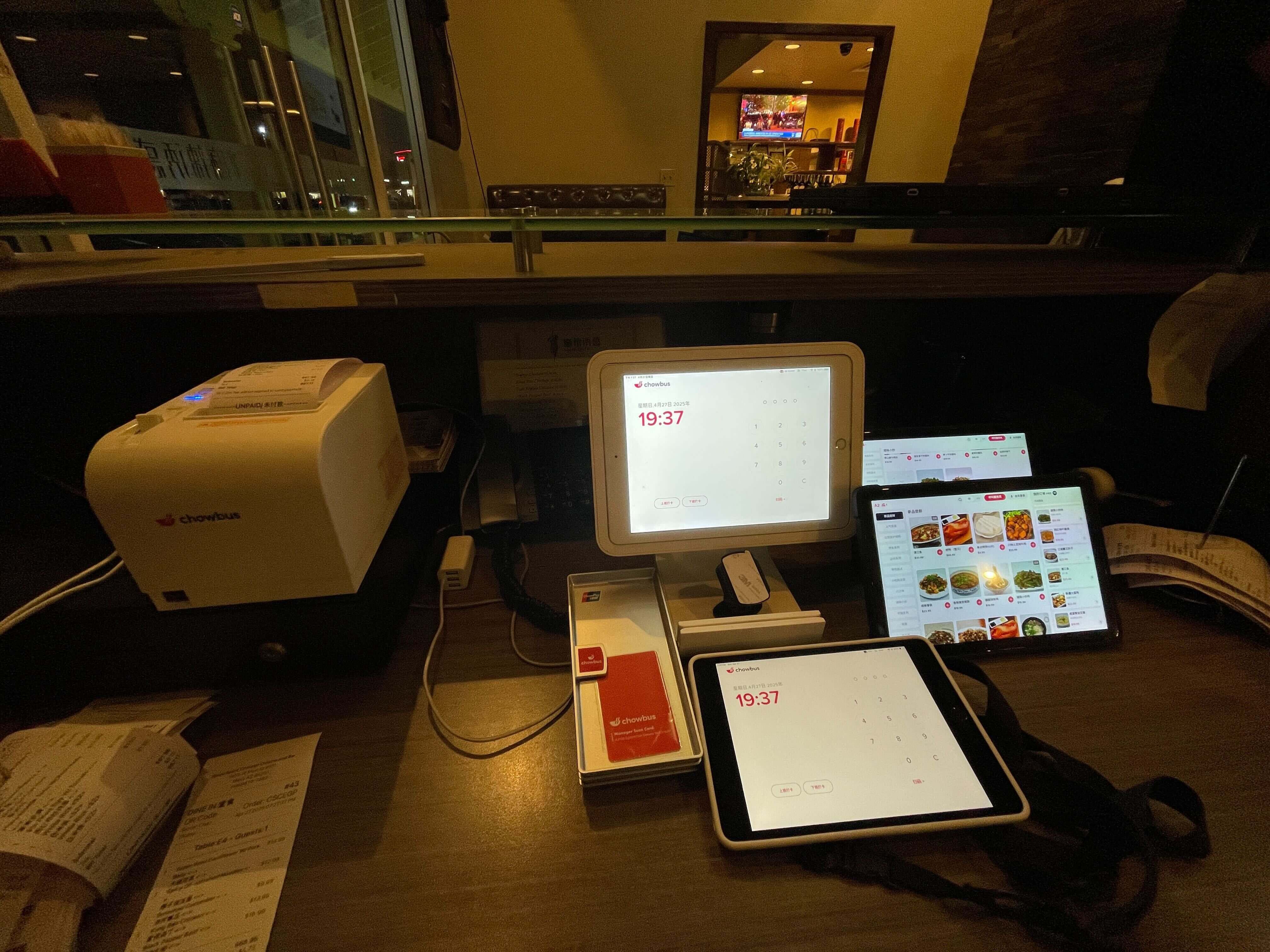
The third is the POS integration — the data pathway that sends orders from the POS to the KDS and returns status from the KDS to the POS. A native integration from a single platform is more reliable than a third-party integration bridge. The depth of this integration determines what information reaches the kitchen screen: item names, modifiers, allergy notes, table numbers, seat numbers, and order time.
The fourth is the network infrastructure — typically a local area network (LAN) connection between the POS and the KDS devices, with cloud connectivity for remote monitoring and management. The LAN connection ensures the KDS continues to function if internet connectivity is disrupted.
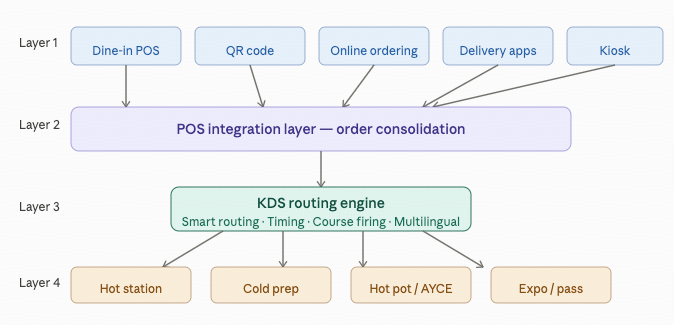
A generic restaurant KDS is built around a standard order flow: a server takes an order, the kitchen makes the dish, the dish goes to the table. Most American restaurant formats follow this structure.
Asian restaurant formats frequently do not. The requirements that distinguish Asian restaurant KDS use cases include:
AYCE and hot pot re-order management. A hot pot table generates a continuous stream of orders throughout a two-hour meal. Each re-order needs to display tagged to the correct table and round so the kitchen doesn't treat it as a new cover. Without this tagging, the kitchen can't sequence the meal correctly.
Multi-course firing control. Many full-service Chinese and Japanese restaurants serve in courses: cold starters, then hot dishes, then rice. The KDS needs to support course-based firing — holding back the hot dish tickets until the server fires the next course — rather than sending everything at once.
Bilingual item display. In kitchens where staff work in Chinese or another Asian language, displaying item names in both languages reduces cognitive load and eliminates translation errors. A dish called "Mapo Tofu" in English is "麻婆豆腐" in Chinese, and a cook who works in Chinese should be able to read it in Chinese.
High per-table item volume. A standard American casual dining table might generate eight to twelve items. A dim sum table or a hot pot table for six can generate twenty to forty line items across a meal. The visual layout of the KDS needs to handle this volume without becoming illegible.
Multilingual modifier display. Special instructions from guests — allergy alerts, spice level preferences, ingredient substitutions — need to display just as clearly in Chinese as they do in English when the cook reading them works in Chinese.
Most generic KDS solutions don't handle these requirements natively. They're built for the standard order flow and treat everything else as an edge case.
The evaluation of any KDS vendor should go beyond price and demo aesthetics. The questions that actually matter in practice are:
Does the KDS integrate natively with my POS, or through a third-party bridge? A native integration means the POS and KDS are from the same platform. A third-party bridge means there is a middleware layer that can fail, introduce delays, or drop modifier data. Native is more reliable. If you're evaluating a KDS separately from your POS, the integration documentation should specify exactly which data fields are passed.
How does the system handle order modifications after an item has been sent to the kitchen? A server who needs to change a dish after the order has been fired — a common scenario — should generate a clear modification alert on the KDS, not just silently update the item. The cook needs to know a change has been made, not just see the updated version without context.
What happens when the internet goes down? Any cloud-dependent KDS should maintain local offline functionality. Orders queued during an outage should process normally and sync when connectivity returns. The period of potential outage — and what kitchen operations look like during that period — should be clearly documented by the vendor.
Is the hardware rated for commercial kitchen use? Consumer tablets fail in kitchen environments. Ask specifically for the operating temperature range, IP protection rating, and recommended cleaning method for any hardware under consideration.
What does the vendor's support look like at 7pm on a Saturday? For Asian restaurants with bilingual staff, support quality includes whether someone who speaks Chinese or another Asian language can get help during peak service hours. Response time and language capability are both relevant.
A kitchen display system installation is typically a same-day or two-day process for most restaurant formats. The hardware mounts are installed, the screens are configured, the routing rules are set, and the kitchen staff are trained on the interface.
The training element is often underestimated. Cooks who have used paper tickets for years are familiar with the physical ritual of the ticket rail. Moving to a touchscreen interface — even a simple one — requires a period of adjustment. Build time for staff familiarization into any rollout plan. A quiet weekday service is a better test environment than a Saturday dinner rush.
Most operators see measurable improvement in order accuracy within the first two weeks. The bigger efficiency gains — in average ticket time and table turnover — typically compound over the first month as staff become fully comfortable with the new workflow.
A kitchen display system is a foundational technology decision, not a peripheral upgrade. The choice of platform, the depth of POS integration, the configuration of routing rules, and the quality of vendor support all determine whether the system performs as expected under real service conditions.
The most common mistake is evaluating KDS options in isolation from the POS. A display that doesn't receive complete order data — including modifiers, allergy flags, and table context — is running with incomplete information. That incomplete information reaches the kitchen, and the kitchen makes decisions based on it. The result is the same category of error the system was supposed to prevent.
For Asian restaurants in particular, the evaluation needs to extend to the specific features that match your service format: AYCE re-order handling, course firing support, bilingual display, and high-volume ticket layouts. These are not edge cases. They are the standard operating conditions of a busy Asian restaurant. A KDS built for a standard American casual dining format won't hold up in those conditions — and discovering that mid-service is a costly way to find out.
Q1: What does KDS stand for, and what is a kitchen display system used for? A: KDS stands for Kitchen Display System. It is a commercial screen or network of screens installed in a restaurant kitchen that receives orders from the POS in real time, routes them to the appropriate cooking stations, and allows kitchen staff to track and mark orders without paper tickets. Its primary purpose is to reduce order errors, speed up communication between front and back of house, and give managers visibility into kitchen performance.
Q2: What's the difference between a kitchen display system and a kitchen printer? A: A kitchen printer produces a physical paper ticket for each order. A kitchen display system shows orders digitally and updates them in real time when modifications are made. The KDS eliminates paper waste and physical ticket management, allows instant order updates without reprinting, tracks order timing automatically, and allows completion status to be communicated back to the front of house. For most high-volume restaurants, the KDS is more reliable and more informative than a printer.
Q3: How much does a kitchen display system cost? A: Hardware costs for a single commercial kitchen display typically range from $400 to $900 depending on screen size and commercial rating. Software is usually subscription-based, ranging from $20 to $60 per location per month. Total cost for a two-screen setup with software runs approximately $1,000–$2,000 upfront plus the monthly subscription. Pricing varies significantly by platform and whether the KDS is bundled with a POS.
Q4: Can a kitchen display system work with my existing POS? A: Most modern POS systems support KDS integration, but the quality of that integration varies. A native integration from a single platform is most reliable. Third-party KDS solutions that integrate via API work in many cases but may not pass all modifier and allergy data. Before purchasing, confirm specifically which data fields your POS sends to the KDS and test the integration with a real modification scenario.
Q5: Does a KDS help with table turnover speed? A: Yes, as a direct result of faster and more accurate kitchen communication. When orders reach the kitchen instantly and cooks have clear visibility into what's needed and in what sequence, preparation time decreases. When the front of house is notified the moment a dish is ready — without waiting for a runner to check — pickup time decreases. Both factors contribute to faster table turnover.
Q6: Is a kitchen display system worth it for a small restaurant? A: For restaurants doing more than fifty covers per service and managing more than one station, yes. For very small operations — under thirty covers, single station — the operational improvement may be marginal compared to the cost. The break-even point depends on how many errors the current system generates and what those errors cost in remade dishes, comped meals, and lost reviews.