Finding the best POS software for your restaurant isn't just about swiping cards or printing receipts anymore. In today’s fast-paced industry, your POS is essentially the "brain" of your business. It’s the heartbeat of your front-of-house service, your kitchen’s best friend, and your back-office data analyst all rolled into one.
With so many options out there, it’s easy to feel overwhelmed by "feature fatigue." This guide skips the sales pitch and focuses on what actually matters: finding a system that makes your life easier and your guests happier.
Think of your POS as the digital glue that holds your operations together. It’s no longer a clunky station in the corner; it’s a platform that connects every part of your workflow.
At its core, a solid system handles:
The goal isn't to find the system with the most buttons—it’s to find the one that fits how your team actually moves.
How it Works in the Real World
To pick the right tech, it helps to look at how it impacts your daily "rush."
Your staff should be able to fly through the menu. Modifiers (like "extra cheese" or "no onions") should be intuitive, not a puzzle. Whether they’re using a stationary terminal or a handheld tablet, the software should stay out of the way of the hospitality.
The modern guest expects options. From split checks and Apple Pay to QR code payments at the table, your POS should make the "boring" part of the meal—paying the bill—fast and frictionless.
You don't need a math degree to run a restaurant, but you do need to know if you're making money. A good system turns raw numbers into clear stories: Is Monday night worth staying open late? Is the salmon special actually profitable?
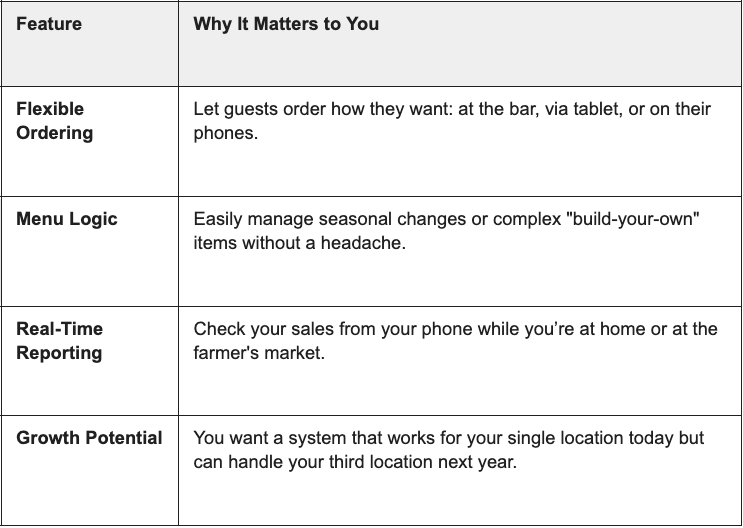
Every concept has different needs. Here is how the "best" POS changes depending on what you’re serving:
A Quick Tip for Operators:
When demoing a system, ask your most tech-averse server to try it. If they can figure out how to ring in a burger and a beer without help, you’ve found a winner.
Is there one "perfect" POS system for everyone?
Not really. The "best" system is the one that solves your specific pain points—whether that’s slow table turns or inventory headaches.
Do I really need tablets?
Not necessarily, but they help. Tablets allow servers to stay on the floor longer, which usually leads to higher check averages and faster service.
How do I know if it’s worth the investment?
Look at the time saved. If a POS saves your manager five hours of paperwork a week and reduces order errors by 10%, it usually pays for itself quickly.